Before the AI era, caching was a system design / backend engineering topic. Most people never needed to know its internals; it was infrastructure trivia for engineers. But today we hit a cache almost every time we run an AI agent or call an LLM API.
You’ve seen the keywords in provider dashboards and usage logs: cache hit ratio, cached input tokens, cache write. If you’re managing a token budget, these numbers decide your bill.
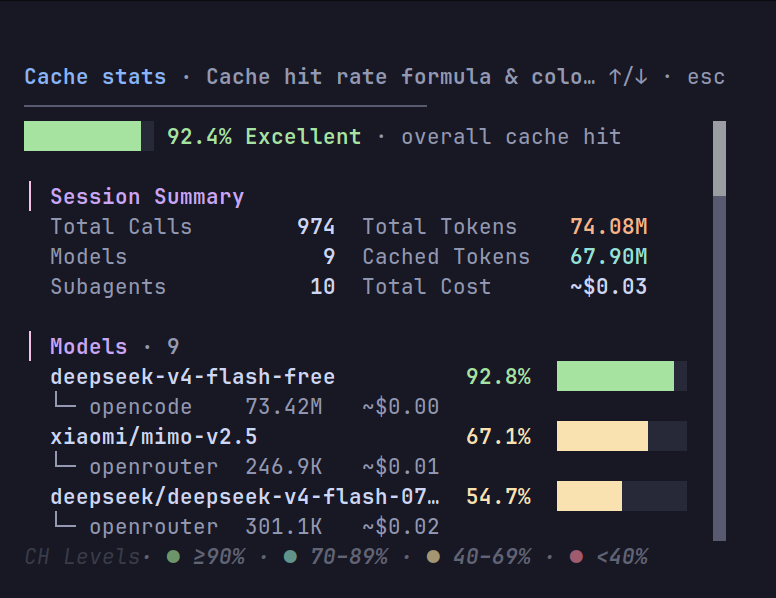
Cache stats dashboard in opencode (https://github.com/nmdra/opencode-cache-stats )
Traditional Caching
Traditional caching is simple to understand: you cache a response based on a request in a fast store like Redis . If the same request comes in again, you return the cached response instead of hitting the database.
This is the cache-aside (or lazy loading) pattern: a cache sits between the API and the data source. On a miss, the backend fetches from the source, stores the result, and returns it. On a hit, the backend serves the stored copy with no database query at all.
Other caching patterns exist too, but this is the most common and simplest.
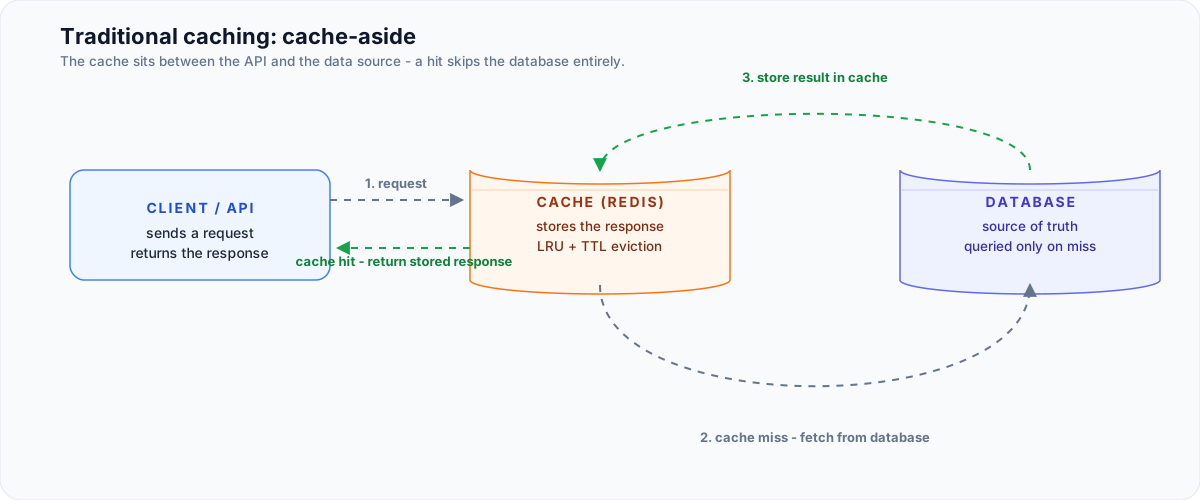
Cache-aside architecture: the cache sits between the API and the data source; a hit skips the database, a miss fetches, stores, and returns
Two properties make this work:
- The request is a reliable key. The same request maps to the same result.
- The response is static. The cached answer stays valid until you invalidate it.
Eviction policies like LRU and TTL keep the cache bounded, and invalidation keeps stale data from leaking out.
The key word here is response. Traditional caching skips the computation and returns a stored answer.
Why LLMs Break This Model
LLMs are not deterministic. Send the same prompt a dozen times and you get different responses each time, even while the provider’s usage report shows cached tokens.
So you can’t cache the answer. A response cache would serve the same text to every user and every request, which defeats the entire point of a generative model. The output must be computed fresh every time.
What can be cached is the expensive internal state computed before the model generates a single token.
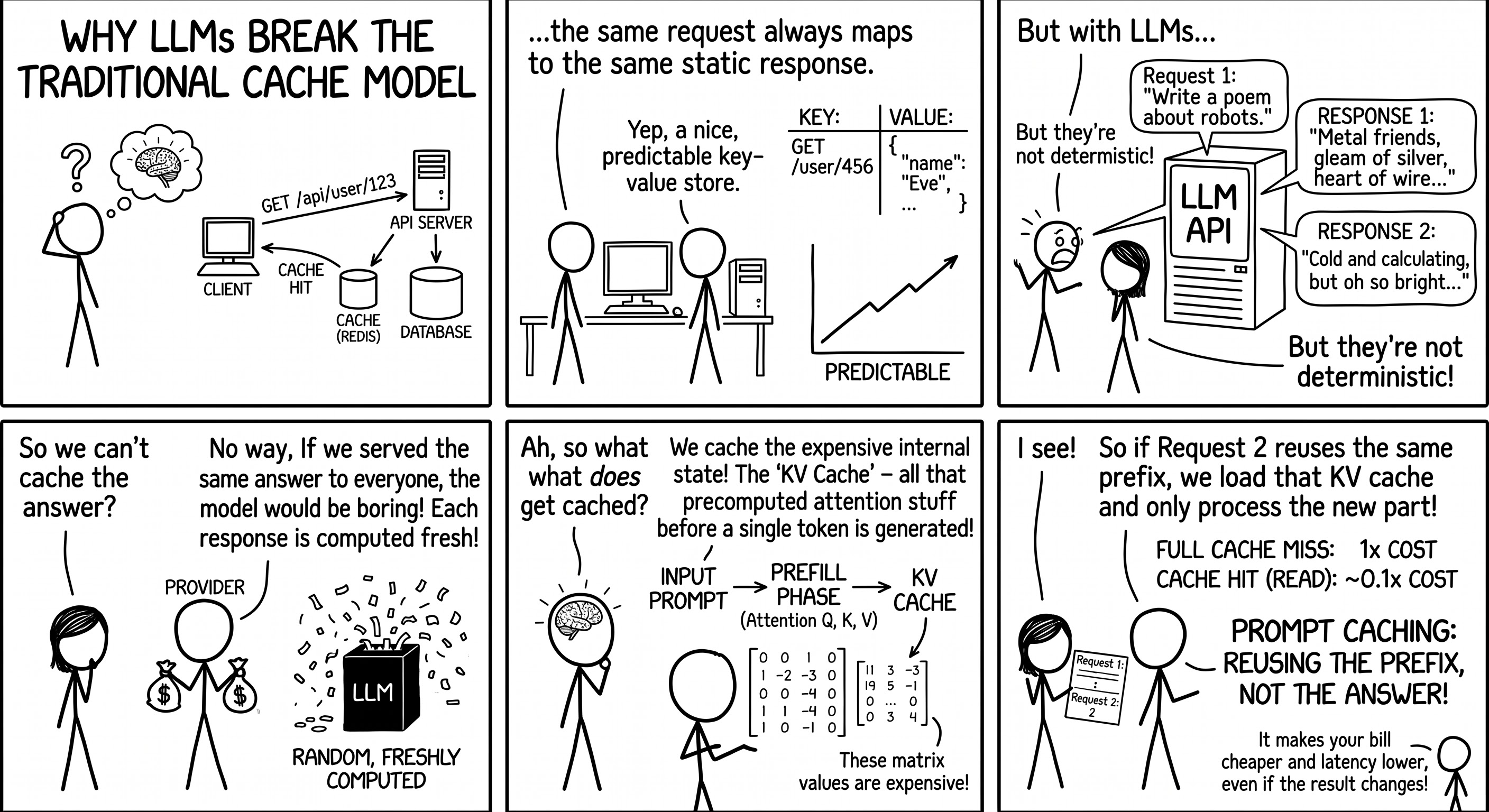
Why LLMs break the traditional cache model: responses can’t be cached, but the KV cache can
What Actually Gets Cached: The KV Cache
To see what providers cache, you need to know how a transformer (introduced in the “Attention Is All You Need” paper) processes a prompt.
Inside every attention layer, each token’s embedding is projected into three vectors:
- Query (Q): “what am I looking for?”
- Key (K): “what do I contain / represent?”
- Value (V): “what information do I pass along if selected?”
Library Analogy
In the Transformer’s attention mechanism, think of Query (Q) as a researcher walking into a library with a specific search topic in mind (“What am I looking for?”), Key (K) as the index label printed on the spine of each book (“What topic do I represent?”), and Value (V) as the actual knowledge written inside those books (“What content do I pass along?”). The system compares the researcher’s query (Q) against every book’s spine label (K) and passes the similarity scores through a softmax function to determine the exact percentage of attention each book deserves; it then uses those percentages to read and blend together the actual text (V) from the most relevant books into a single contextual output.
When a new token is generated, the model compares its query against the keys of all previous tokens to score relevance, then blends the corresponding values. That attention computation is the most expensive part of inference.
A transformer processes a prompt in two broad phases:
- Prefill: reads the input tokens and computes attention state for them.
- Decode: produces new tokens one at a time.
At each attention layer, every processed token produces a key and a value. For the next generated token to attend to everything that came before, those K and V vectors are needed again, so instead of recomputing them, the model retains them in what’s called the KV cache.
This is a pure speed optimization: it makes generation much faster, and it doesn’t change the model’s answers at all. The trade-off is memory: the cache grows with your context length, so longer prompts and bigger batches need more GPU/RAM. Providers use various tricks, like compressing the stored values, to keep that memory under control.
Prompt Caching: Reusing the Prefix
When you send a request to an LLM provider, the first pass through the transformer produces K and V tensors for every token in your prompt. That’s work the provider had to pay for. Prompt caching keeps that KV state around so a follow-up request that starts with the same prefix can skip it.
Here’s the mental model:
- Request 1:
[system][tools][user][assistant][tool result][user]→ prefill computes K and V for every token. - Request 2: same prefix plus
[new message]→ the provider loads the cached K and V for the matching prefix and prefills only the new suffix.
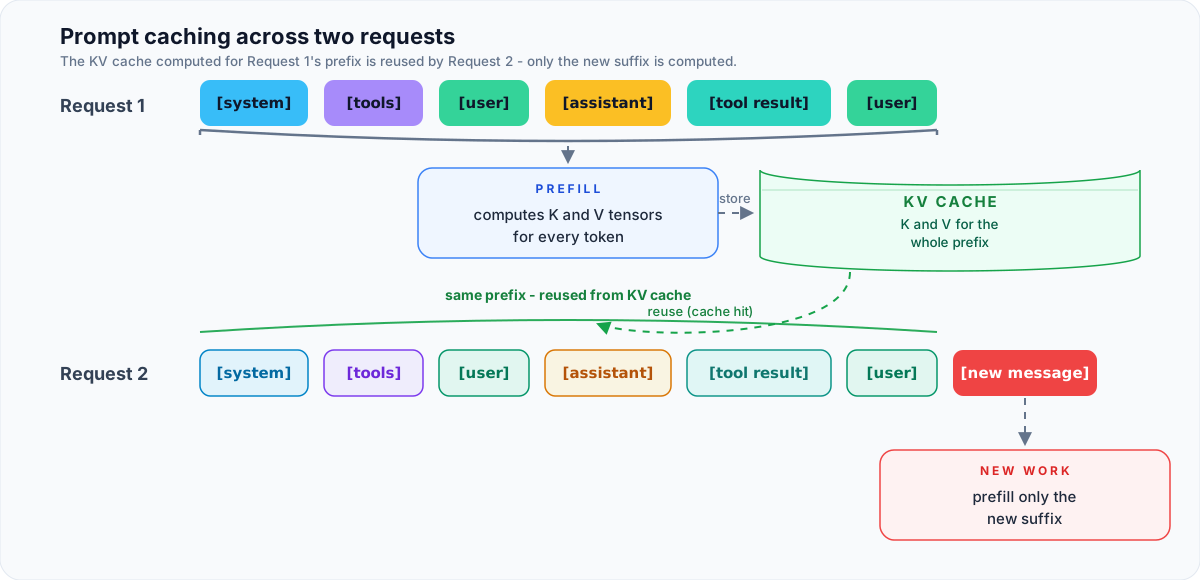
The KV cache mental model: Request 1 stores K and V for the whole prefix, Request 2 reuses them and prefills only the new suffix
Providers hold on to these matrices for a short window after a request (TTL, not forever), typically a few minutes up to an hour, depending on the provider. If a new request starts with the same prompt, even partially, providers reuse the matched portion of the cached K and V rather than recalculating it. Providers also differ in how caching is activated: some cache automatically, others require you to mark cache breakpoints in the request, but the underlying mechanism is the same KV state.
Note what this is not:
- It’s not your prompt text stored in a database.
- It’s not the answer: the model still generates a fresh response to your actual new input every time.
- It’s not an extension of your context window. Caching only affects compute cost, not how much the model can attend to.
Why It Changes Your Bill
A cache hit skips the most expensive part of inference, the forward pass over the prefix, so the provider’s marginal cost drops to something closer to a memory read than a computation. Pricing reflects that. Most providers bill across four buckets:
| Category | What it means | Relative cost |
|---|---|---|
| Regular input | Freshly processed, non-cached tokens | 1× (baseline) |
| Cache write | First time a prefix is seen; provider computes and stores the KV cache | Usually Free |
| Cache read (hit) | Prefix matches an existing cache entry; provider just loads it | ~0.1× baseline |
| Output tokens | Generated tokens, never cached, always computed fresh | 1× (output rate) |
In practice, cached input tokens are billed at a small fraction of the regular rate, often ~0.1× (up to 10× cheaper) on current models, with cache hits also cutting time-to-first-token latency substantially on long prompts (up to 85% in some provider claims).
Cache writes are usually free, but a few providers charge a write premium or hourly storage for explicitly managed caches, so one-off prompts can cost more than uncached requests on those providers.
That’s why the cache hit ratio you see in dashboards matters: it tells you what fraction of your input tokens actually benefited from the discount.
Getting Actual Cache Hits
Caching is not something you enable and forget; it’s something you structure your prompts and agents around:
- Static content first, dynamic content last. System prompt → tools → docs → conversation → current message. Anything after the first change breaks the cached prefix.
- Keep prefixes byte-identical across calls. Even whitespace or wording tweaks (“a helpful assistant” vs. “an extremely helpful assistant”) create a different cache entry.
- Don’t rebuild system prompts per request. Stabilize them; treat them as append-only where possible.
- Match your call frequency to the TTL. If your app calls with the same context every 10 minutes but the TTL is 5, you’re always paying cache-write rates.
- Don’t cache one-off prompts. Translation requests, single Q&A, anything genuinely unique gets no benefit, and sometimes a net cost increase.
- Watch what your tools touch. Using many MCPs and tools with your agent also risks breaking the cache, since some edit the context and cause cache invalidation.
The biggest wins come from long-lived, mostly-static prefixes reused within the TTL window: agents, coding tools, RAG pipelines, long chats. These workloads repeat huge prefixes on every turn.
These trade-offs show up in real tools. In my experience, the Pi agent has a well-designed architecture for keeping a high cache hit ratio, Reasonix is optimized around the DeepSeek API’s caching, and the newer DeepSeek Harness delivers noticeably better cache performance.
Summary
| Traditional caching | Prompt caching |
|---|---|
| Reuses a completed answer | Reuses transformer computation (KV state) |
| Skips inference entirely | Still generates a fresh response |
| Only works for identical requests | Works even if the question differs |
| Implemented via app/database cache | Implemented via KV cache |
LLMs made caching weird again. The cache in your dashboard isn’t a database of answers; it’s a pool of precomputed attention state, sitting on GPUs for a short window, waiting for your next request to reuse it. Structure your prompts as static-first, reuse them within the TTL, and the cache hit ratio becomes your friend; ignore it, and you’re quietly paying extra for nothing.
References: Prompt caching: 10x cheaper LLM tokens, but how? (Sam Rose) · KV Caching Explained (Hugging Face) · Earendil: Prompt Caching · DeepSeek API Context Caching